
Please click each title to to expand each section and view support:
Guidance
|
When a learner is unable to sit an examination at their centre due to exceptional circumstances — such as a serious medical condition, suspension or exclusions — they can be transferred to another centre to sit examinations.
The transferred candidate process covers the externally assessed, written components for A level, GCSE, International GCSE, International A levels and NQF next generation BTECs only.
For more information about transferred candidates, please see the JCQ guidance linked below:
|
|
Deadlines
| Date | Qualification | Exam series | Description | | 21/03/26 | International GCSE, GCSE, IAL, AS/A level, AEA, Edexcel Award, iPrimary and iLowerSecondary, Mathematics in Context, Level 2 Extended Mathematics Certificate | Jun 26 | Deadline to request transferred candidate arrangements |
|
|
Fees
|
There is a charge for transferred candidates; please see below:
- £15 (Not including VAT) per paper before the deadline.
- £30 (Not including VAT) per paper after the deadline.
|
|
How to apply
|
To access the application, please follow the below steps once logged in to Edexcel Online:
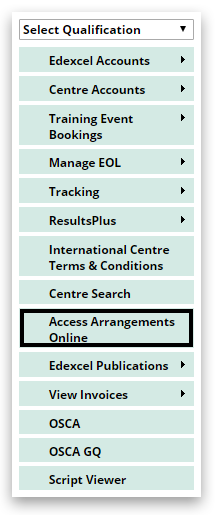
1. Select 'Access Arrangements Online' on the left side menu:
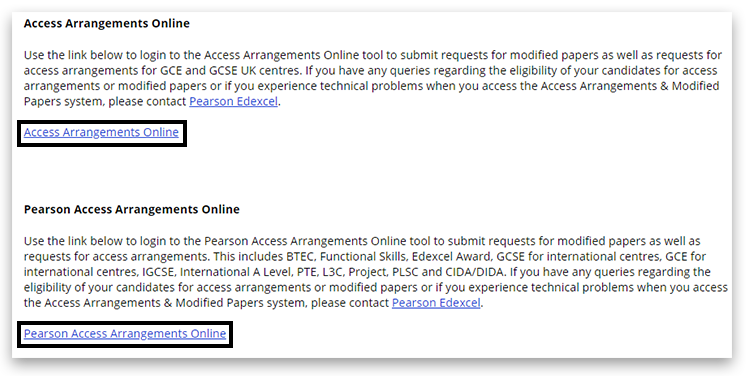
2. Click on 'Access Arrangements Online (AAO)' or 'Pearson Access Arrangements Online (PAAO)' as appropriate. If you are unsure which platform you require, there is information on the page listing each qualification type and which platform you should use:
For additional support using PAAO, please see PAAO: Pearson Access Arrangements — Creating an Application and PAAO: Pearson Access Arrangements — Finding an Application / Viewing Outcomes.
3. On the CAP home page, scroll down and choose 'Application for transferred candidates':

4. The customer will complete the form and, when finished, click on Send at the bottom of the form. An email will get sent directly to the Exams Officer at the other centre with a reference number beginning with TCA. The host centre will then be able to continue with the second part of the application (see below):

|
|
Accepting an application (host centre)
|
1. On the CAP home page, scroll down and choose 'Search':

2. Enter the below details:
- Enter the 'Centre number' (N.B. this is pre-populated for external CAP users)
- Select 'Application of transferred candidates' from the 'Form type' dropdown
- Enter the 'Form reference', which was confirmed to the customer by email
- Click 'Search'
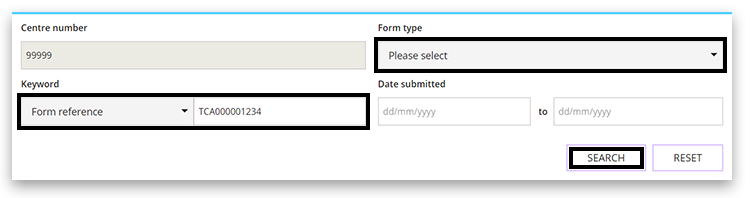
3. On the search results, you will see the application details. The customer will click on 'Open form' to complete the rest of the application:

Further information regarding transferred candidates can be found on our website.
For any queries regarding transferred candidates, please contact the transferred candidates team by creating a new case record.
|
|
Middle East Regional Support for May/June 2026
|
If you are based in the Middle East and are impacted by the current situation in the region, please follow the below guidance on the dedicated Transferred Candidate process for you.
Please continue to make your qualification exam entries as normal where possible.
If you have a learner who is unable to sit an examination at your centre due to exceptional circumstances, they can be transferred to another centre to sit examinations.
Please complete the forms below and return to transferredcandidates@pearson.com:
If you have concerns around this, please reach out to your local Pearson Contact or our customer support teams.
Please note: Transferred Candidate applications can be submitted beyond the published deadline.
|
|
Back to Special Requirements: Access Arrangements & Special Considerations main index page.


