Salesforce

To access Classic Knowledge, you must run the Lightning Knowledge Migration Tool. Learn More

Benefits of upgrading to Lightning Knowledge:

  • Better article editing experience
  • Improved search functionality
  • AI-driven Knowledge recommendations

After migration, Classic Knowledge remains.

Results: Grade Boundaries

« Go Back

Information

 
TitleResults: Grade Boundaries
URL NameResults-Grade-Boundaries
Issue

Where can I view grade boundaries?

FAQ

  
Grade boundaries documents are produced for each qualification for each exam series and are made available on results day.

Please select from the options below to find downloadable PDFs for the required exam series and qualifications:

Locating grade boundaries using Edexcel Online

1. To sign in, please go to https://edexcelonline.pearson.com; you will be asked to enter your usual Edexcel Online credentials, and once you click sign in, a verification code will be sent to the Pearson Authenticator app. 
For further information, including downloading the app to your mobile device and using it to complete the sign-in process. Please see Pearson Portal Authenticator for details.  

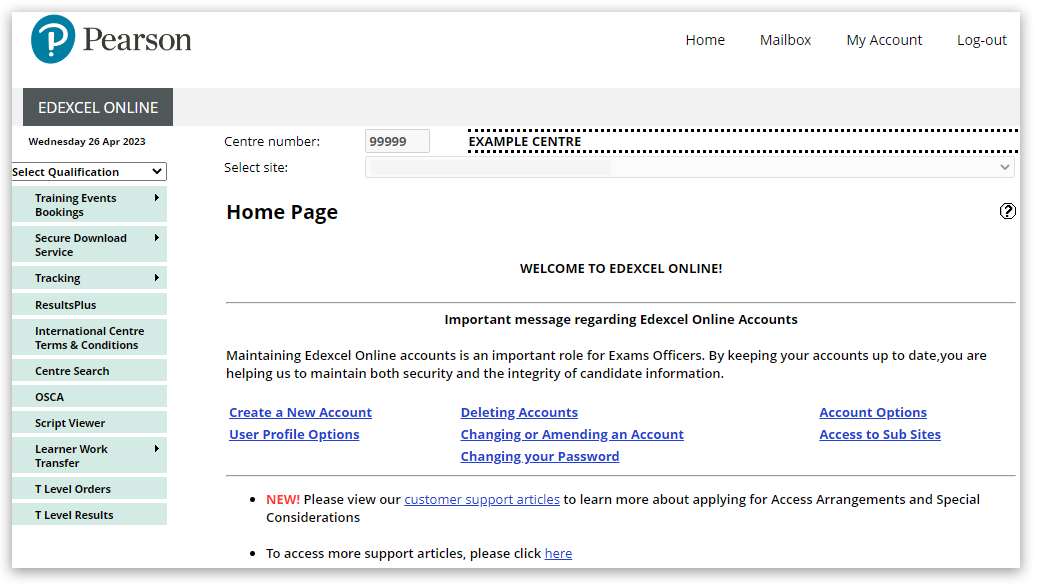
2. You will then be directed to the EOL home page:
eol large ds copy.png

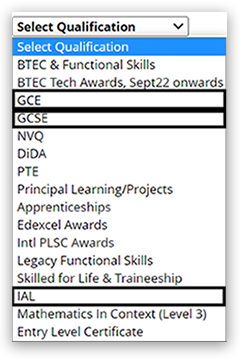
3. Click on 'Select Qualification', then select either GCSE, GCE (A Level) or IAL (International A Level):
eolqual1 ds copy.png 
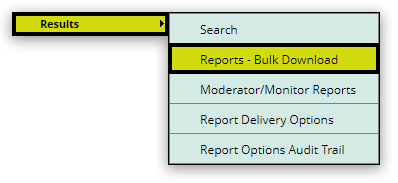
4. Hover your mouse over 'Results' and then click on 'Reports bulk download' from the menu on the left side of the page:
EOL45.png 
5. Select your session, then select 'Grade Boundaries.' You can choose more than one report: 
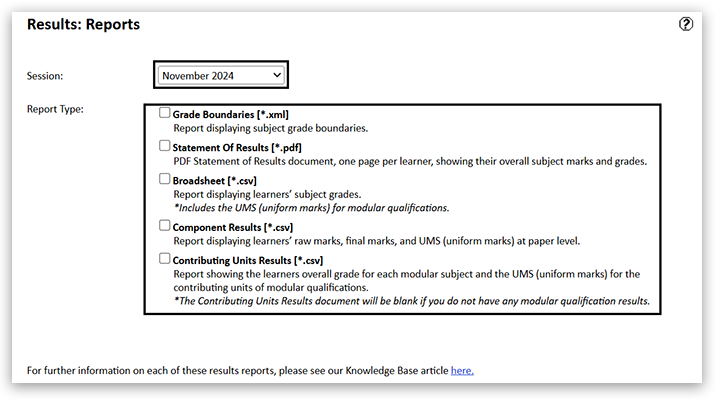
Once the report option has been selected, click the 'Submit' button:

  
6. The report will appear in your Edexcel Online mailbox within 2 hours:

EOL3.png 
The report is presented in XML format; however, this file can be opened in spreadsheet software such as Microsoft Excel.

The report contains separate tabs for notional component grade boundaries and subject grade boundaries for the subjects your centre has delivered this summer.

The full set of grade boundaries for all subjects will be published on our qualifications website and can be accessed by Teachers on the Thursday of each official results week(s).

Please also see Results Reports: Breakdown Of Candidate Results for an explanation of what the other available reports contain. 

How to open XML files downloaded from Edexcel Online

If you are downloading grade boundaries from Edexcel Online, please be aware that these are uploaded into Edexcel Online as XML files. To open an XML file downloaded from Edexcel Online, firstly locate the file in your download folder and then right-click, choose 'Open with' and select 'Excel' from the listed options:  

xml files ds copy.png
If 'Excel' doesn’t appear as an option, use the 'Choose another app' option and search for Microsoft Excel. 

Earlier exam series grade boundaries

Please note: use the links below to view grade boundaries from earlier exam series on our website:

How grade boundaries are set - 2025 guide

To help centres understand grade boundaries for 2025 we’ve produced a short guide explaining the approach to grade boundaries that all exam boards will be taking for 2024:

General guide
If you would like to see how grade boundaries are set in general, please watch this video guide: 

C5.png

Back to Results, Post-Results & Appeals support index.


Detailed Instructions

N/A 


Powered by