|
Deletions can be actioned via Edexcel Online prior to the deadline. Please follow the below steps once logged in:
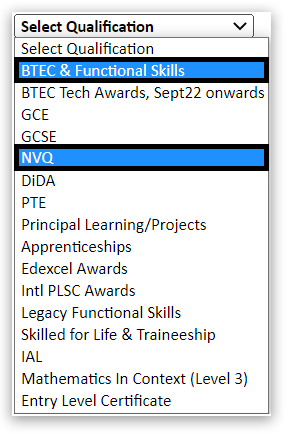
1. Select a vocational qualification type from the qualification drop down box such as BTEC & Functional Skills or NVQ:
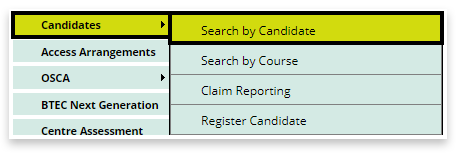
2. Choose 'Candidates' and 'Search by candidate' from the menu on the left of the page:
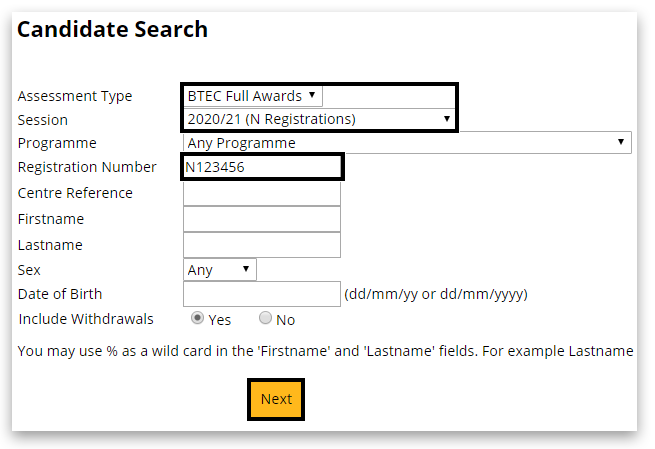
3. On the candidate search screen, enter the learner's registration number or use the search filters to locate your learner's registration.
Please note: the search facility works best with only 1 or 2 pieces of information:
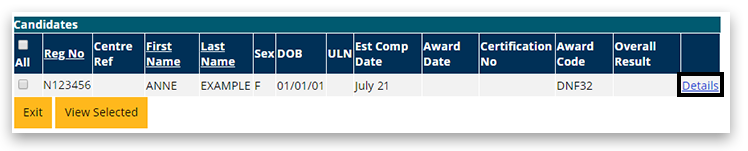
4. In the next window, click on 'Details' of the right side of the table:
5. Scroll to the bottom of the page and click on 'Edit':

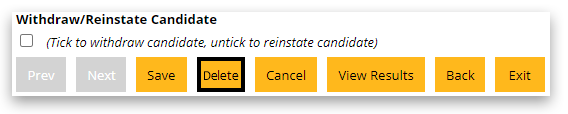
6. Scroll again to the bottom of the page, and select the 'Delete' button. It will ask you then to confirm the deletion.
Related Articles:
Edexcel Online: Withdrawing Learner Registrations
Registrations: Deletion and Withdrawal Refunds
Back to Entries & Registrations index page.
Back to Functional Skills: Support Index.
| 

