
If you need to make an amendment to a candidates personal details or planned completion date, you can do this through Edexcel Online. Please see the following steps once logged in.
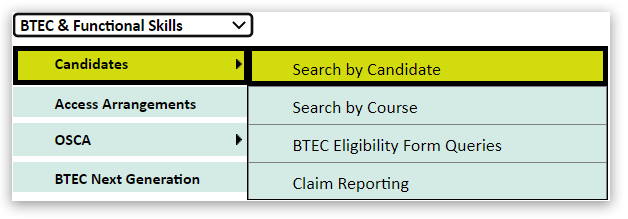
1. Select 'BTEC & Functional Skills' from the qualification drop-down box, then choose 'Candidates' and 'Search by candidate':
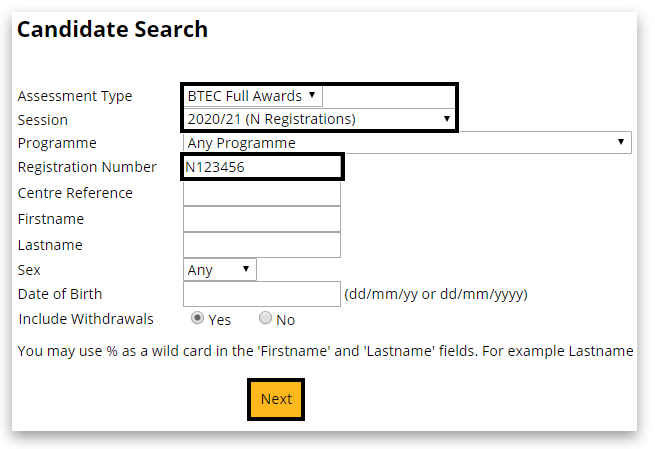
2. On the Candidate search screen, keep the 'Assessment type' the same, select your 'Session' and enter the registration number. Click 'Next':
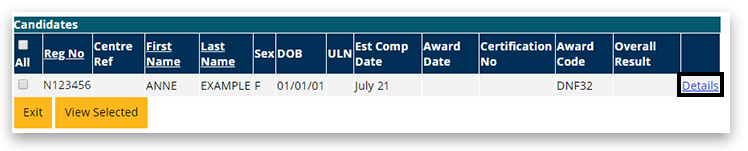
3. In the next window, click on 'Details' of the right side of the table:
4. Scroll to the bottom of the page and click on 'Edit':

5. You can make your amendments to any personal detail or planned completion date. Once happy, scroll down to the bottom of the page and click on 'Save':
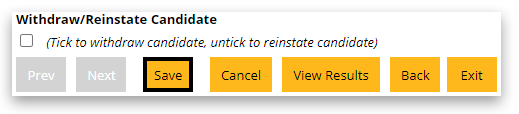
You can only make 1 set of amendments. Once you have saved the record and need to make further changes, you will need to request this through Customer Services by creating a new case record.
Related Articles:
Registrations: Withdrawals/Deletions (International)
Pearson Support Portal: Creating An Account
Pearson Support Portal (Staff at Centres & Associates): Creating A Case Record
Back to Entries & Registrations main index page.


