
Pearson reserves the right to suspend a customer’s finance account if payment terms and conditions are not met or invoices are not paid in full by the due date.
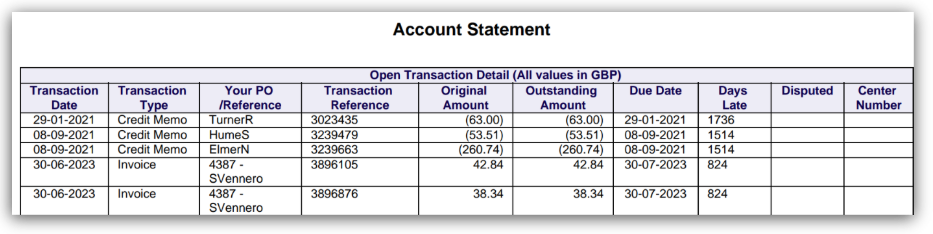
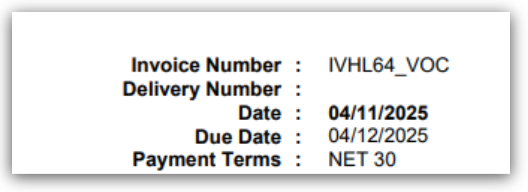
You can find your payment terms on all financial documents:
Your monthly statement: (The Transaction Date and Due Date):
Your invoice copies (found top right of the invoice):
Please note: Your finance account is not the same as your Centre number (NCN), which is given to you when you are approved as a Pearson qualification customer. Your customer account number can be found in the upper right-hand corner of your invoice.
In accordance with the Centre approval and qualification policy, an account suspension imposes specific restrictions and operational requirements on centres. Until the suspension is lifted, centres are prohibited from engaging in certain activities, including:
- Advertising or promoting Pearson qualifications
- Recruiting and enrolling new learners for Pearson qualifications
- Placing orders, registering new learners on Pearson qualifications, and in some circumstances, booking Pearson tests
Should your finance account be suspended and you need to make entries for learners currently on programme, please contact Customer Services for guidance and assistance.
Persistent late payment and noncompliance can result in your account being referred to a third-party collector, with the additional collection costs charged to your organisation. It can also result in a permanent removal of Pearson Centre and qualification approval.
The suspension will only be lifted once full payment is made. If you find yourself in this situation, please do reach out to our Collections team on the toll free number +44 800 781 1377 to discuss a potential way forward, of all overdue invoices.
Access your finance account in our self-service portal, iPay:
iPay allows you to:
- make secure payments by card online.
- download copies of invoices and credit notes.
- view or download your current statement of account.
- Allocate payments and credit notes.
This service is available twenty-four hours a day, seven days a week, all year round.
For further information, please see iPay: Online Account FAQ Index.
Related Articles:
Pearson Support Portal: Creating An Account
Pearson Support Portal (Staff at Centres & Associates): Creating A Case Record
Invoices: Requesting Copy Invoices, Statements & Credit Notes
Invoices: Disputes
Back to Invoice Query, Statements & Payments index page.


