|
Please follow the below steps once logged in.
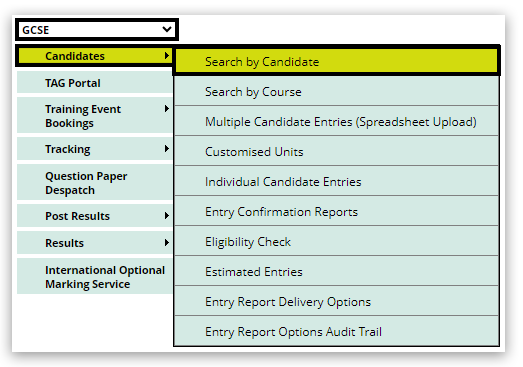
1. Select your qualification from the drop-down box, hover over 'Candidates' and click on 'Search by candidate':
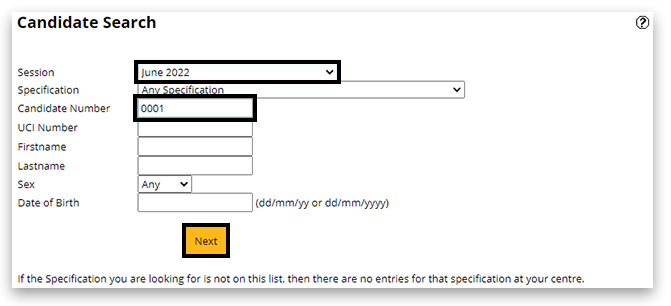
2. Select the Session and enter the candidate number. Click 'Next':
3. A new window will appear. Click on 'Details' highlighted in blue:

4. Click on 'Edit' at the bottom of the page:

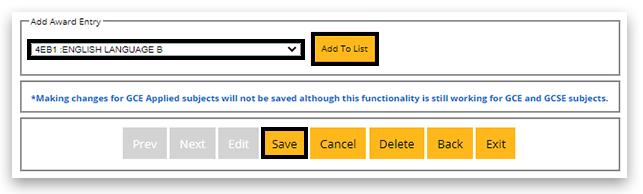
5. To add a unit/award: Under the table of entries you will find 2 drop-down boxes:
- Add Unit Entry (legacy qualifications)
- Add Award Entry (current linear subjects and legacy award codes/cash-in codes)
In the relevant drop-down box, select the required entry code and click on 'Add to list'. It will now appear in the table, click on 'Save' at the bottom:
Please note:
To remove a unit/award code: Within the table, you will see on the right side under the 'Withdraw' column a link named, 'Delete'. You can remove single units/award codes here; however, if it leaves no units or awards at all, you must add another unit/award code or delete the entire candidate at the bottom of the screen. After the amendment has been completed, click 'Save' at the bottom of the page.

6. If the selected Award code has available options, you can set them in the table of entries by selecting the drop-down box in the 'Options' column. After the amendment has been completed, click 'Save' at the bottom of the page. Further information about available option codes can be found in the Pearson Information Manual:

Please note:
If you require entry codes for GCSE History, please use our GCSE History entry code calculator.
| 

