Once a date has been agreed between you (the apprentice) and the training provider for the EPA knowledge test, a booking can be made through ACE360. After the booking request has been submitted successfully, the EPA Test Delivery team will use the information and create your (apprentice) record & test session in Rogo.
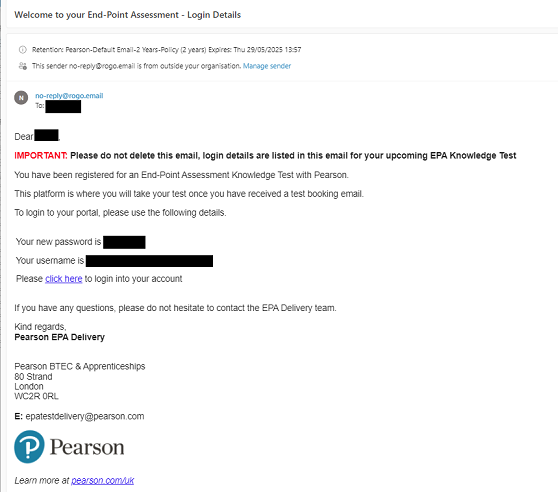
- You will receive a welcome email from Rogo which will provide you with your login credentials.
- Included in the welcome email will be a direct website link to access Rogo.
- Please enter your email address and the alphanumeric password generated by Rogo.
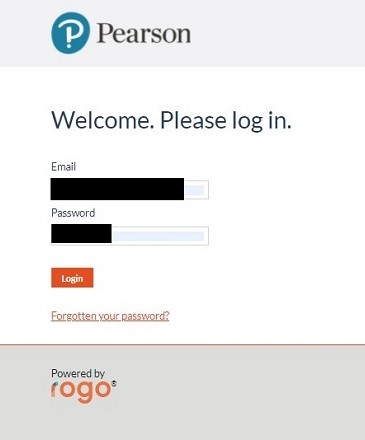
- Once you have successfully logged in using the details provided, you can change your details.
- Select the My Profile tab from the top of the screen, in this screen, you can change your name, email address, and password.
- Please Note: If you have changed any of the details above you must log out of Rogo for the changes to take effect.
- From the login screen, please select Forgotten your password?
- A new box will expand where you can enter your email address so your password can be automatically reset.
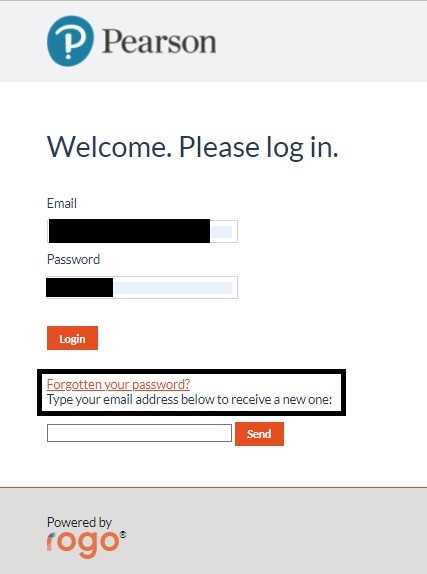
- Please enter your email address and click Send.
Related Rogo Articles:
End-point Assessment: Rogo FAQs
End-point Assessment: Rogo - Apprentice Assessment Checklist
End-point Assessment: Rogo - Technical Requirements
End-point Assessment: Rogo - Technical Support & Troubleshooting
End-point Assessment: Rogo - Receiving Emails
End-point Assessment: Rogo - Access Arrangements & Reasonable Adjustments
End-point Assessment: Rogo - Practice EPA Knowledge Tests
End-point Assessment: Rogo - Accessing the EPA Knowledge Test
Back to EPA Delivery Index


