
The withdrawal process on Edexcel Online is used to mark candidates who can no longer complete their qualifications. Withdrawing candidates also prevents the Standards Verification process from selecting these candidates as part of the sample of work.
A withdrawal will not provide a refund of the registration fee, as this would require the registration to be entirely deleted from Edexcel Online. If deletion is required, please see Registrations: Processing/Requesting a Deletion (UK Centres).
For support to withdraw or delete registrations for BTEC Tech Awards 2022, please see BTEC Tech Awards 2022: Withdrawing Registrations.
Please follow this step-by-step process to withdraw a learner from Edexcel Online:
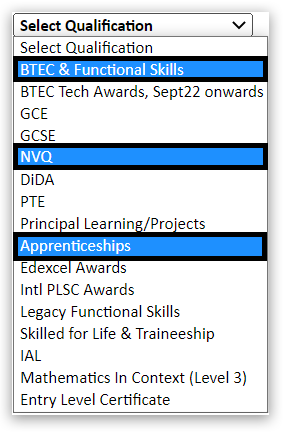
- Select a vocational qualification type from the qualification drop-down box, such as BTEC & Functional Skills, NVQ or Apprenticeships:
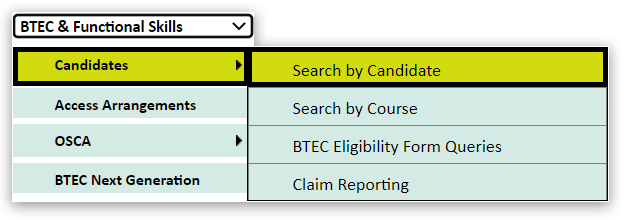
2. Choose 'Candidates' and 'Search by Candidate' from the menu on the left of the page:
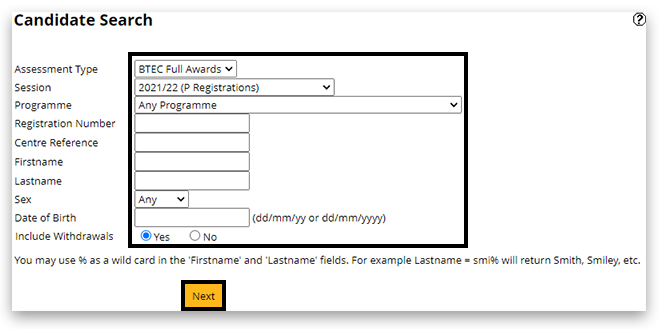
3. On the candidate search screen, use the search filters to locate your learner's registration.
Please note: the search facility works best with only 1 or 2 pieces of information:
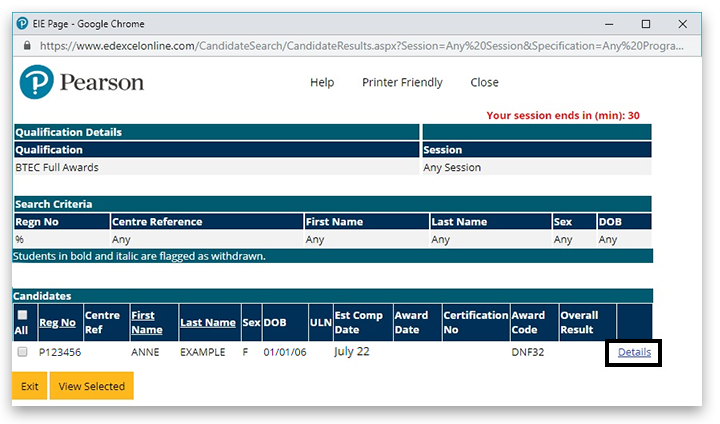
4. In the next window, click on 'Details' on the right side of the table:
5. Scroll to the bottom of the page and click on 'Edit':

6. Scroll again to the bottom of the page, tick the 'Withdraw' option, then click on 'Save':
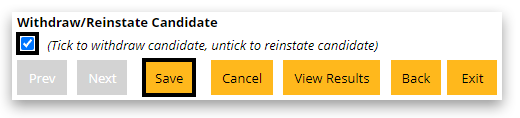
7. The candidate is now withdrawn. You can check this back on the candidate search screen - any details that are bold italic means they are withdrawn:

If a candidate returns and wants to carry on with their course, you can reinstate the registration by following the first 5 steps, then remove the tick from the withdraw option before saving.
Back to Registrations: Deletion and Withdrawal Refunds.
Back to Entries & Registrations index page.


