
To apply for Access Arrangements for any UK or International qualification, the Exams Officer should work closely with the SENCo.
A successful application will remain valid for 26 months from the point of approval; therefore, any further exams taken within this period do not require additional applications, and the existing arrangements will remain in place.
Please note: Before any application is made, candidate consent MUST be given by asking them to read and sign the 'Data protection notice' found on the Centre Admin Portal, further details on CAP. The data protection notice can be kept on record within the centre.
Applications must be processed and approved before an examination or assessment. You can check the deadlines for submitting applications for the upcoming series'.
Please click each title to expand and view support:
Which tool do I use?
|
Both tools are accessible via Edexcel Online. The qualification you are applying for determines which tool to use:
Use the JCQ 'Access Arrangements Online (AAO)' tool for:
- GCE (UK Centres)
- GCSE (UK Centres)
- Functional Skills (paper-based and onscreen)
- BTEC Firsts
- BTEC Nationals
- BTEC Technicals
- BTEC Tech Award (2022) — please tick the 'New Tech Award' option
- T Levels
Use the 'Pearson Access Arrangements Online (PAAO)' tool for:
- GCE (international centres only)
- GCSE (international centres only)
- International GCSE
- International A Level (IAL)
- Pearson Test of English (General & Young Learners)
- Edexcel Certificate
- Primary and Lower Secondary Curriculum
- Edexcel Award
- Level 3 Core Maths
Our Pearson Access Arrangements Online system will allow centres to gain an immediate response for Access Arrangements and order modified papers. Please see PAAO: Pearson Access Arrangements — Creating an Application and PAAO: Pearson Access Arrangements — Finding an Application / Viewing Outcomes for detailed guidance.
|
|
How to apply (step-by-step)
|
To access AAO or PAAO, please follow the below steps:
1. To sign in, please go to https://edexcelonline.pearson.com; you will be asked to enter your usual Edexcel Online credentials, and once you click sign in, a verification code will be sent to the Pearson Authenticator app.
For further information, including downloading the app to your mobile device and using it to complete the sign-in process. Please see Pearson Portal Authenticator for details.
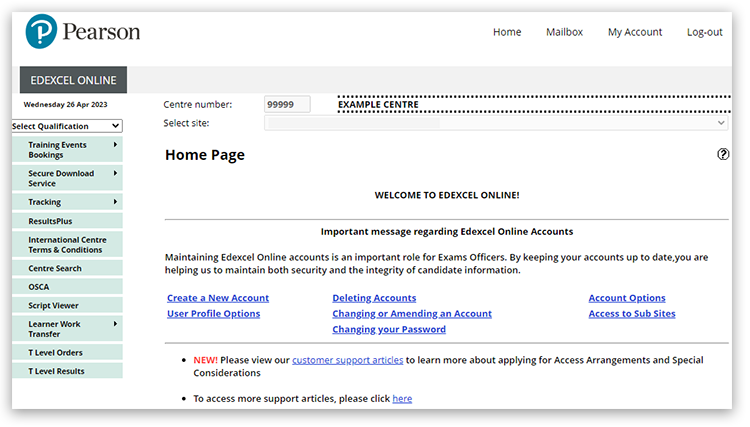
2. You will then be directed to the EOL home page:
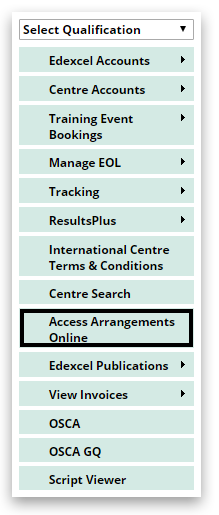
3. Select 'Access Arrangements Online' on the left side menu:
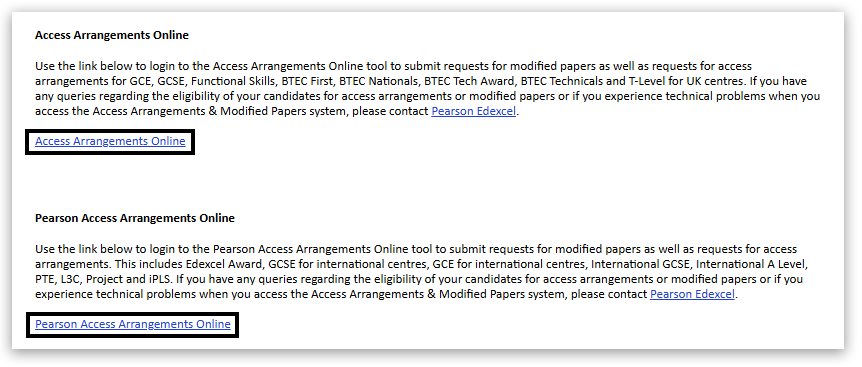
4. Select either 'Access Arrangements Online' or 'Pearson Access Arrangements Online' — this will take you to the relevant Centre Admin Portal (CAP):
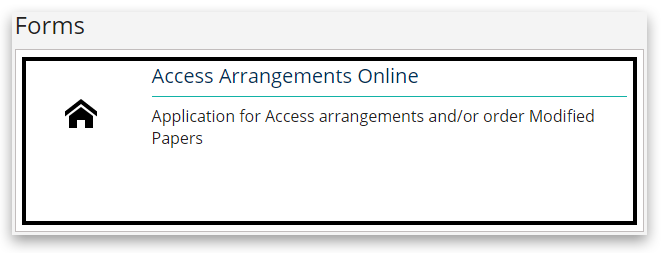
5. On the CAP, scroll down and select 'Access Arrangements Online':
Please see PAAO: Pearson Access Arrangements — Creating an Application for detailed support in creating applications and PAAO: Pearson Access Arrangements — Finding an Application / Viewing Outcomes for locating existing applications and viewing referral outcomes.
|
|
Video guides
How to create an application in PAAO
How to create a candidate in PAAO
Printing an application from PAAO
|
|
Types of Access Arrangements and their application platform/method
| Type of Access Arrangement | Application process | | 25% extra time | Apply on CAP (AAO/PAAO where appropriate) | | Bilingual dictionary | Apply on CAP (AAO/PAAO where appropriate) (not available for Level 3 BTEC & AS/A level. Centre delegated for Functional Skills, no need to apply) | | Braille | Apply on CAP (AAO/PAAO where appropriate) | | Coloured/Enlarged/PDF paper | No application — contact a Customer Services Specialist who can arrange this. | | Computer reader/Reader | Apply on CAP (AAO/PAAO where appropriate) | | Fidget spinners | Centre delegated, no need to apply — can be used to calm the nerves of candidates | | OLM (Oral Language Modifier) | Apply on CAP (AAO/PAAO where appropriate) | | Practical assistant | Apply on CAP (AAO/PAAO where appropriate) | | Prompter | Centre delegated, no need to apply | | Read aloud / reading pen | Centre delegated, no need to apply | | Scribe | Apply on CAP (AAO/PAAO where appropriate) | | Sign Language Interpreter | Apply on CAP (AAO/PAAO where appropriate) | | Supervised rest breaks | Centre delegated, no need to apply | | Word processor | Centre delegated, no need to apply |
More information is located in 'Chapter 8 — Processing applications for access arrangements and adjustments' of the Access Arrangements and Reasonable Adjustments 2025/26 handbook (from page 112).
|
|
Additional support and e-learning
|
Our On-Demand E-learning modules allow you to access free training at a time that suits you. The following modules are available:
- GQ Bitesize Module 3 — Access Arrangements (UK centres)
- Combined BTEC & GQ Bitesize — Access Arrangements (International centres)
- BTEC Bitesize Module 6 — Access Arrangements (UK centres)
|
|
Please note: Functional Skills extra time is no longer centre-delegated, and centres will have to submit an application for these requests using the AAO portal; some access arrangements for Functional Skills are centre-delegated and can be approved without an application. This guide explains whether you need to apply for an access arrangement via the PAAO tool.
All rules and regulations can be located in the JCQ Access Arrangements and Reasonable Adjustments 2025/26 (PDF download).
Related Articles:
Access Arrangements: Deadlines
Access Arrangements: PAAO No awarding body error message
Access Arrangements: Late Applications
Back to Special Requirements: Access Arrangements & Special Considerations index page.


